Plan the work. Skip the seat math.
Boards, lists, and tasks built for small service teams — not a 30-tab Work-OS you need a consultant to set up. Included in your $14 SB seat — every app, one login, one bill. Great on its own, and on the same account as SB Time Tracker.
Included in your $14 SB seat · 30-day free trial · No credit card
Enough to leave the spreadsheet. Not so much you need an admin.
List & Board
The two views small teams actually use — a clean list and a kanban board with columns you name and reorder. Drag tasks across, or bulk-edit a stack of them at once. No 10-view zoo to configure.
Real tasks
Assignee, due date, priority, tags, subtasks, and a checklist — set one to repeat daily, weekly, or monthly, and link your docs in Google Drive, OneDrive, or Dropbox. Comments and @mentions keep the discussion in one place.
Timeline
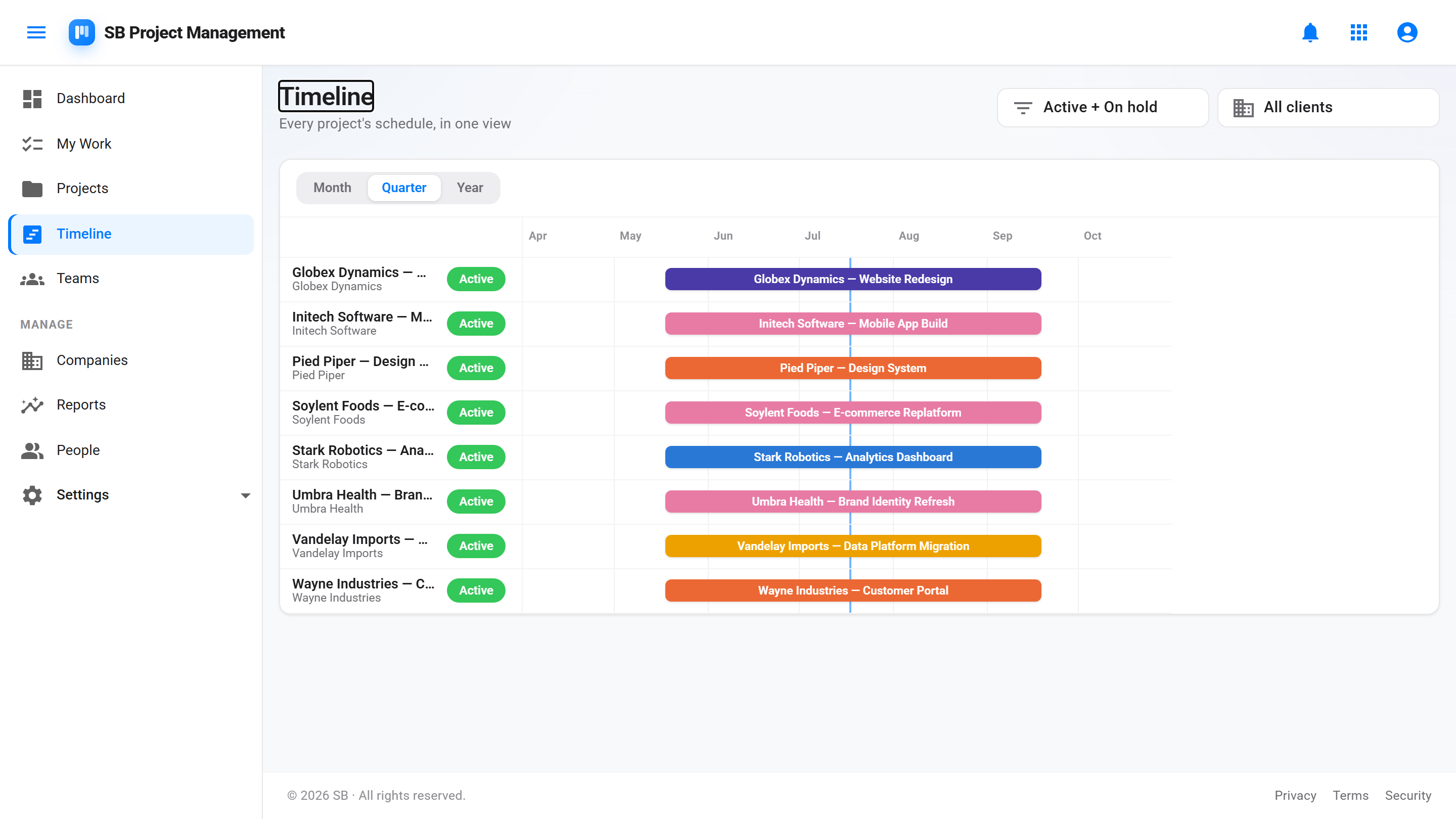
See every project on one timeline. Bars per project across Month, Quarter, or Year zoom — colored by project, filtered by status or client. Each project gets its own timeline tab too, so a plan is never more than a click away.
Task dependencies
Mark a task blocked-by the work it's waiting on. Blocked chips show up on the board and list, "blocks" shows the other direction, and finishing out of order gets a heads-up — a warning, never a wall.
Custom fields
Add the fields your work actually needs — text, number, date, or a pick-list — per project, not buried in a global admin. Fill them in the task drawer and filter the board and list by them.
Automations — uncapped
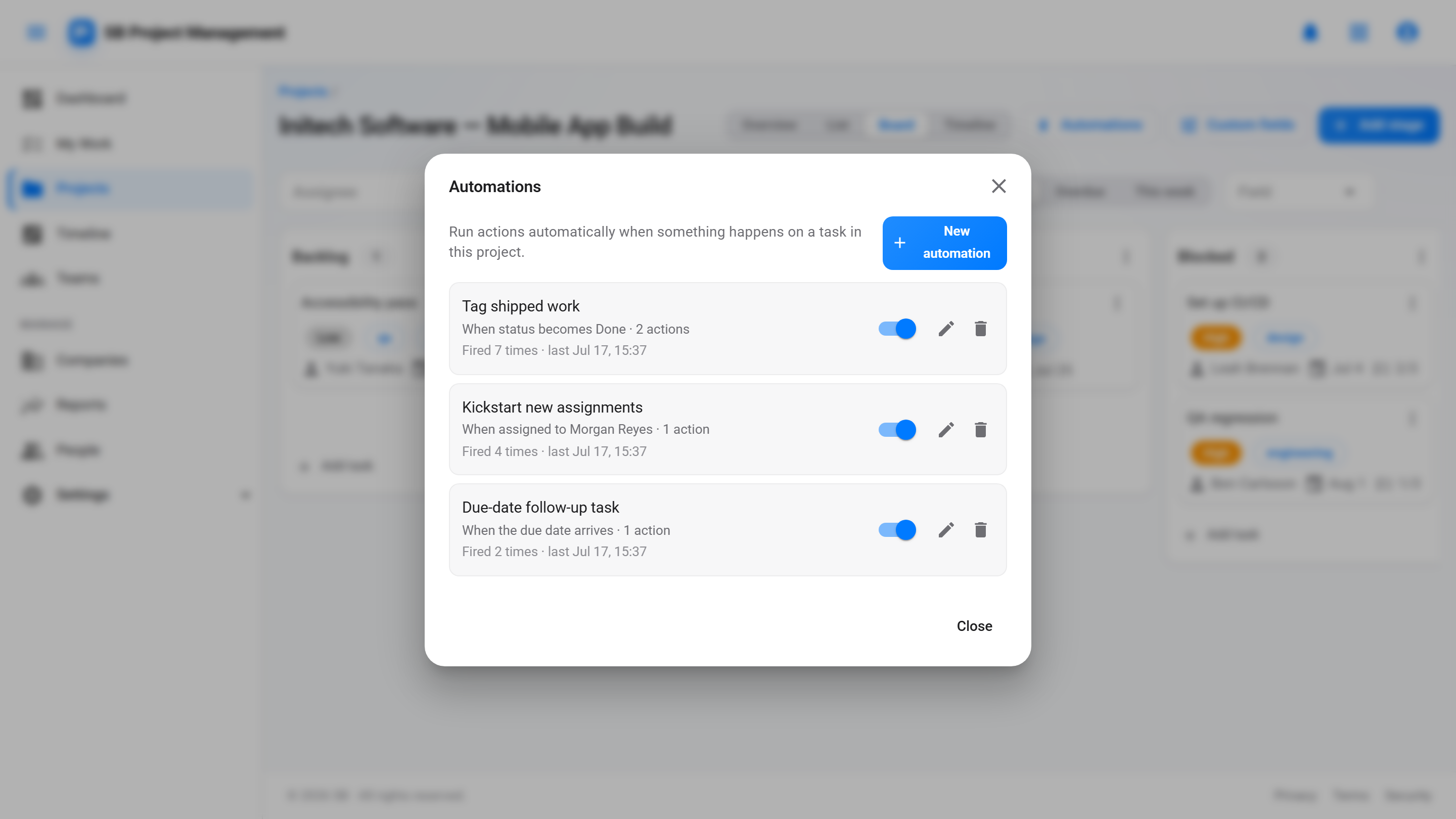
When a status changes, a task is assigned, or a due date arrives — set a status, assign, tag, notify someone, or spawn a task from a template. Every run is included: no monthly action quota, no automation meter, ever.
Task templates
Start from a template, not a blank box. Seven built-in description formats — user story, acceptance criteria, definition of done, bug report, spike, decision record — plus checklist templates and a custom library your admins curate.
Markdown descriptions & comments
Write tasks and comments in Markdown — headings, lists, links, code — rendered safely, with an expandable editor when a task outgrows a single paragraph.
My Work & dashboard
Everyone gets one personal view of what's assigned to them, plus a dashboard that opens to what's overdue, due today, and coming up — across every project.
Reports that show where you stand
Five tabs: budget vs logged hours on projects linked to Time Tracker, estimate accuracy, a per-client rollup, workload against each person's capacity, on-time rate and cycle time, and everything overdue. Filter by project, client, team, or person, and the filters live in the URL so a view is a link.
Review before it starts
Gate backlog work behind a multi-reviewer readiness check, so nothing moves into progress until the right people have signed off.
Bring your data — and keep it yours
Import projects and tasks from CSV to migrate in minutes, and export back to CSV any time. Round-trip safe, so nothing's locked in.
Stays on top of it
In-app and email notifications for @mentions, new assignments, and due-soon reminders — plus an optional once-a-day digest, tuned per person.
Team-based access
Grant a team access to a project once; everyone on it is in. Team leads manage their own team, and key changes are recorded in an append-only audit log.
Included in your seat
Project Management is part of your $14 SB seat — every app, one bill. No per-app charge, no separate plan to buy.
One account
Same SB sign-in, same clients, same bill as SB Time Tracker. Add it when you're ready; no second setup.
The plan, on one horizontal line.
Every visible project laid out as a bar across a shared calendar — a monday.com-style view without the monday.com setup. Colored by project, filtered by status or client, and zoomable from Month to Quarter to Year. Drill into any single project for its own timeline tab, where task lists act as scheduled phases.
- Cross-project view at /timeline, plus a per-project timeline tab
- Month / Quarter / Year zoom with pan controls
- Per-project color, shared with the task list palette
- Status and client filters
Set it once. Never count runs.
Per-project rules that do the busywork: when a task's status changes, when it's assigned, or when its due date arrives — set a status, assign it, add a tag, notify a person, or create a follow-up task from a template. Other tools sell automations back to you in monthly action quotas; here every run is part of your seat.
- Three triggers × five actions — the recipes small teams actually use
- No run caps, no automation meter — uncapped, included
- Every run is visible: an "Automation" actor in task activity and the audit log
- Loop-safe by design — an automation's changes never chain into more automations
When you also run SB Time Tracker, delivery and billing share a home.
Project Management stands on its own. But on an account that also has Time Tracker, the work you plan and the time you bill finally live in one place. Set a budget in hours on a project and track it against the time your team actually logs — plan and actuals side by side. Your clients are shared across the suite — add a customer once and it's there in both apps, no re-entering — and there's no second login or second invoice to juggle.
See SB Time Tracker →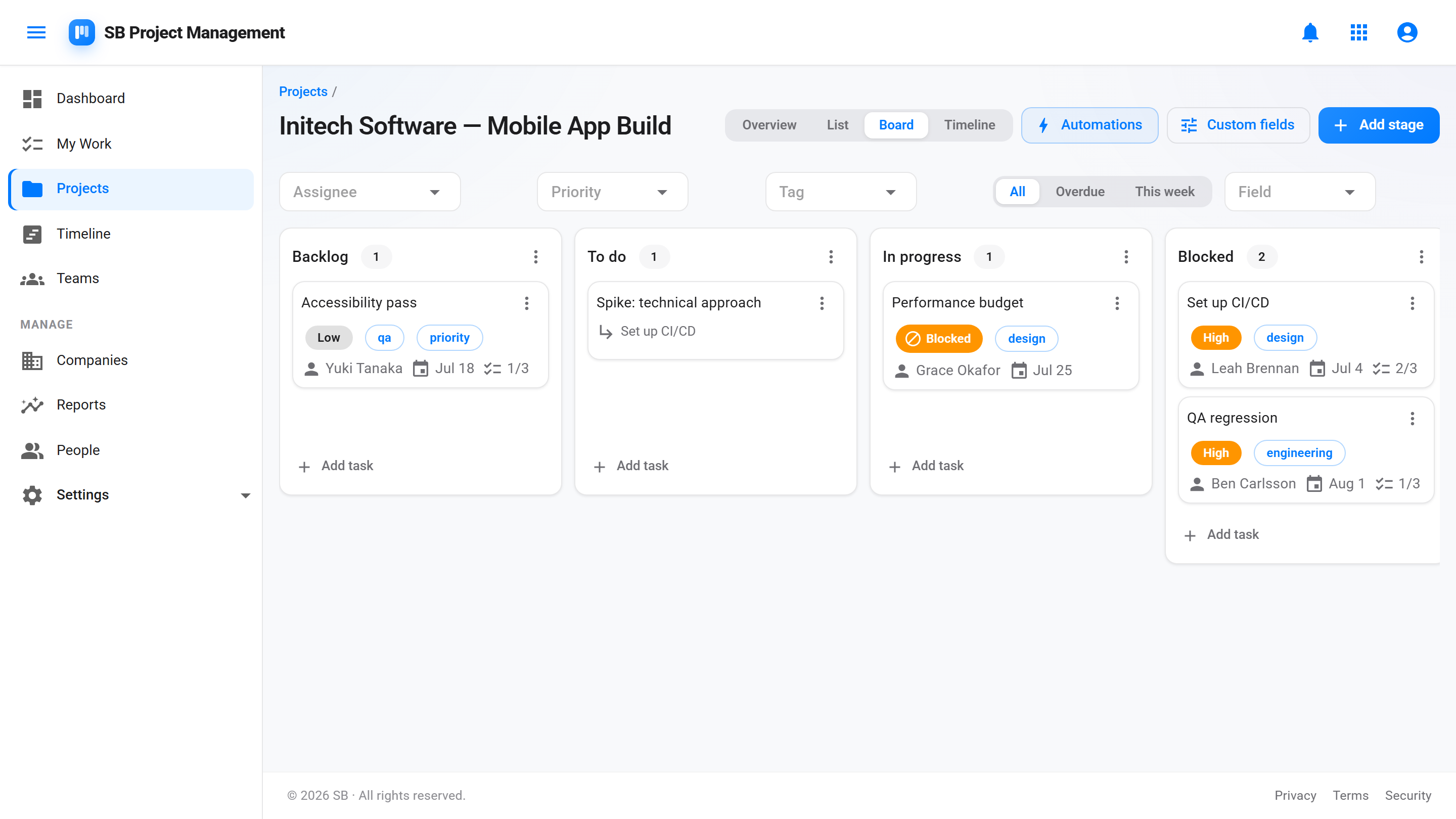
Putting an AI agent on your backlog
You can connect Claude — or any other tool that speaks MCP — to your projects, with access you grant and a key you can revoke. Step-by-step setup is on the agent setup page.
What is agent access?
A way to let an AI agent work in your projects without handing it your login. You create an agent under Settings → Agents, it gets its own identity and its own API key, and you point an MCP-capable client — Claude Code, VS Code, GitHub Copilot — at your workspace's agent endpoint. Nothing to install: one command and a key. The agent reads the backlog you prioritized, works items, and reports back in comments.
What can an agent actually do?
Lists, tasks, subtasks, and comments — create, read, update, complete, and reopen them inside the projects you've granted. That's the whole surface. It can't delete anything, can't touch billing, people, or settings, can't manage teams or projects themselves, and has no access to Time Tracker or CRM at all. It also can't sign in to the app: an agent has no password and no login, and an API key is the only way to act as one.
How is its access scoped?
Through Teams, exactly like a person's. Add the agent to a team, put that team on a project, and it can work there. A brand-new agent belongs to no team and sees nothing — it fails closed, so you never have to remember to restrict it. Most people give it one dedicated backlog project to start and widen from there.
How do I cut it off?
Three levers, from narrowest to broadest. Revoke a key and it stops working on the agent's very next request. Deactivate the agent and every one of its keys stops at once — its keys are kept, so reactivating brings them back. Or remove the team grant and it stays connected but sees nothing. Keys also expire: you choose one month, six months, a year, or never when you issue one.
Can I see what the agent did?
Yes, in the places you already look. Its work appears on the board and in each task's activity feed under its own name, never mixed in with yours, and every change it makes lands in the audit log with its identity attached. Its comments are attributed to it too. If you want a quick pulse check, the agent's card shows when each key was last used.
How many agents can I have?
One per account while agent access is in Beta. One agent can hold up to five active keys, though, so it can run from several places at once — your laptop, CI, a second workspace — with each place holding its own revocable key.
Does an agent use a billable seat?
No. An agent isn't a person, so it doesn't count toward your seat total and doesn't change your bill.
What happens if my account lapses?
The agent follows the same rule everyone else does. A read-only account can still be read — the agent can list projects and tasks — but writes are refused until the account is current again. An agent can never write where a person on your account couldn't.