Stop emailing PDFs.
Each client gets a read-only portal where they can see their own invoices and logged hours. One URL, one login, no shared inboxes. And every sent invoice has a hosted page you can link anyone to — where clients pay online by card or ACH.
30-day free trial · No credit card · Every feature included
A read-only window into the work you've done.
Invoices
See open and paid invoices in one list.
Hours
Logged hours by project for the current month. The same numbers that show up on their invoice — visible before the invoice is even sent.
Per-contact login
Add multiple contacts under one client; each gets their own private login. They sign in at /portal. Deactivate a contact when someone leaves their company without affecting the rest.
Read-only access for client contacts.
Linked to your client records via PortalClientId. The Client role only sees their own client's data — never another client's, never internal projects, never user-level cost rates. Lives under /portal in your subdomain.
- Per-client access scoped via PortalClientId
- Open + paid invoice list
- Logged hours by project for the current month
- Multiple contacts per client, each with their own private login
- Hardened authorization — no cross-client leakage
A link anyone can open — no portal account needed.
Separate from the portal login, every sent invoice carries its own secure public link. "Send to client" emails it; whoever opens it sees the invoice — status, line items, totals, payment terms — and downloads the PDF, no account required. Connect your Stripe account and the same page takes card and ACH payment; the invoice marks itself Paid when the money settles.
- Hosted view-and-pay page on every sent invoice
- "Send to client" emails the secure link for you
- Online card + ACH payment via your own Stripe account
- Regenerate or invalidate the link any time
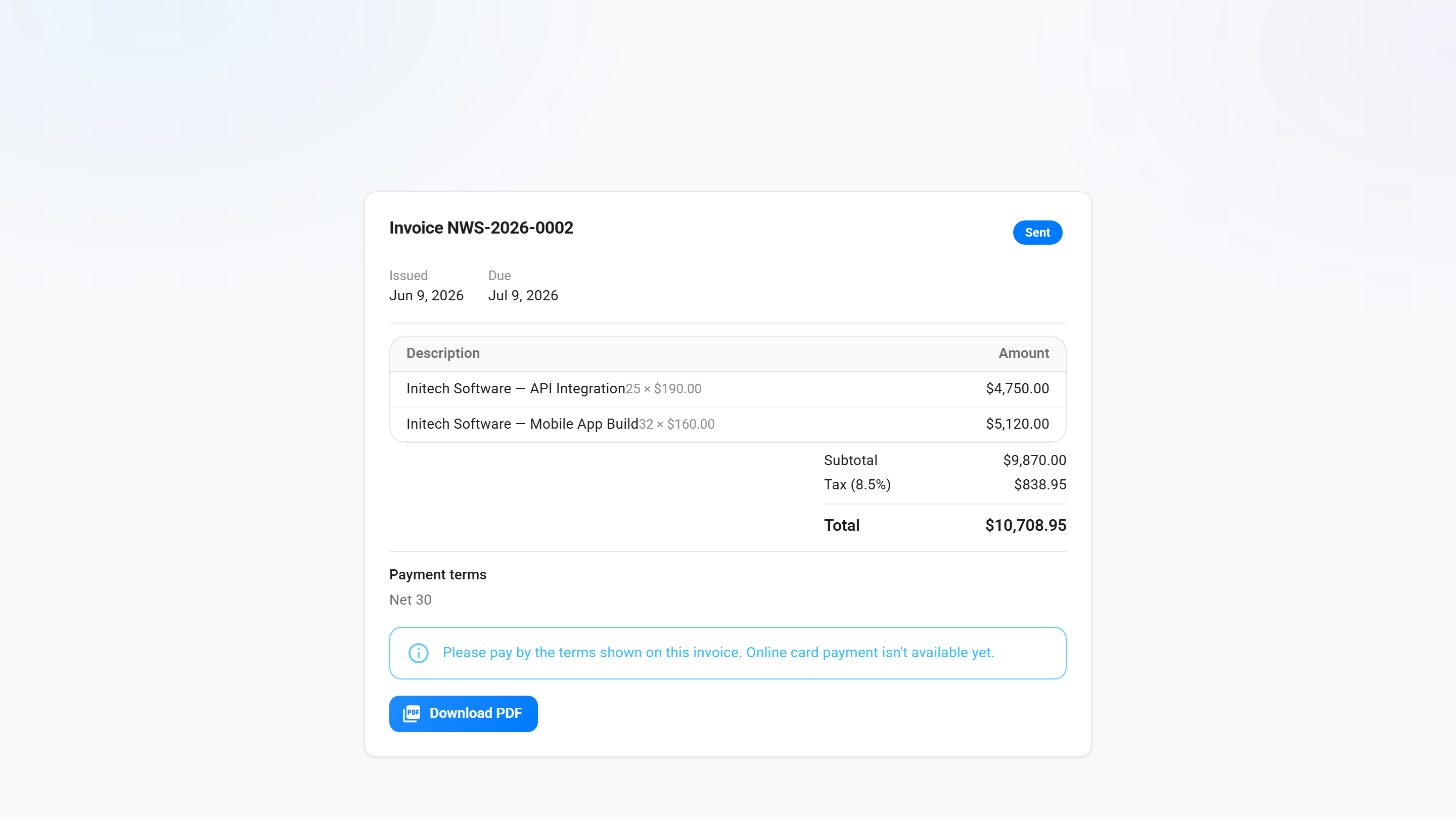
What the portal does today, what's coming.
Today: read-only invoice list, logged hours visibility, per-contact login, hardened cross-client isolation — and a hosted page on every sent invoice. Clients open a secure link, see status and line items, download the PDF, and pay by card or ACH once you've connected your Stripe account; "Send to client" emails the link for you.
Roadmap: client-side approval of quotes / proposals, and client-shared documents. Both follow the same scoped-by-PortalClientId pattern.
Common questions
Can the client see internal hourly rates?
No. The portal shows the totals on their invoices and logged hours by project. Your internal cost and billable rates are never shown in the portal.
How do clients log in?
Each client contact you add gets their own private login and signs in at /portal under your subdomain. The Client role is locked to portal pages only — they can't reach any internal page.
Can I have multiple contacts per client?
Yes. Add as many as you need under one client record. Each contact has their own private login and signs in with their own account. Deactivate a contact when someone leaves their company — the rest keep working.
Can the client see other clients' work?
Never. The Client role is scoped to a single PortalClientId. Every portal query filters by it. There's no admin-level switch that bypasses this — even SuperAdmins can't impersonate a Client into another Client's data.
How do clients pay online?
Connect your Stripe account under Settings → Online Payments. From then on, every hosted invoice page shows a Pay now button — the client checks out on Stripe by card or ACH, the money lands in your own Stripe account, and the invoice marks itself Paid when the payment settles. If you don't connect Stripe, the page stays view-only.