Built for the way agencies actually bill.
Retainers that auto-invoice. Project P&L with real margin %. Cost rate vs billable rate, with per-person-per-project overrides. Designed for small business US shops, not 200-seat enterprises.
30-day free trial · No credit card · Every feature included
Built to bill client work from day one.
SB Time Tracker was built first to run billing at FMLY Consulting, a small consultancy, so retainers, cost rates and dunning are built in from the start.
Five things every agency needs that most trackers fumble.
Retainers that auto-bill
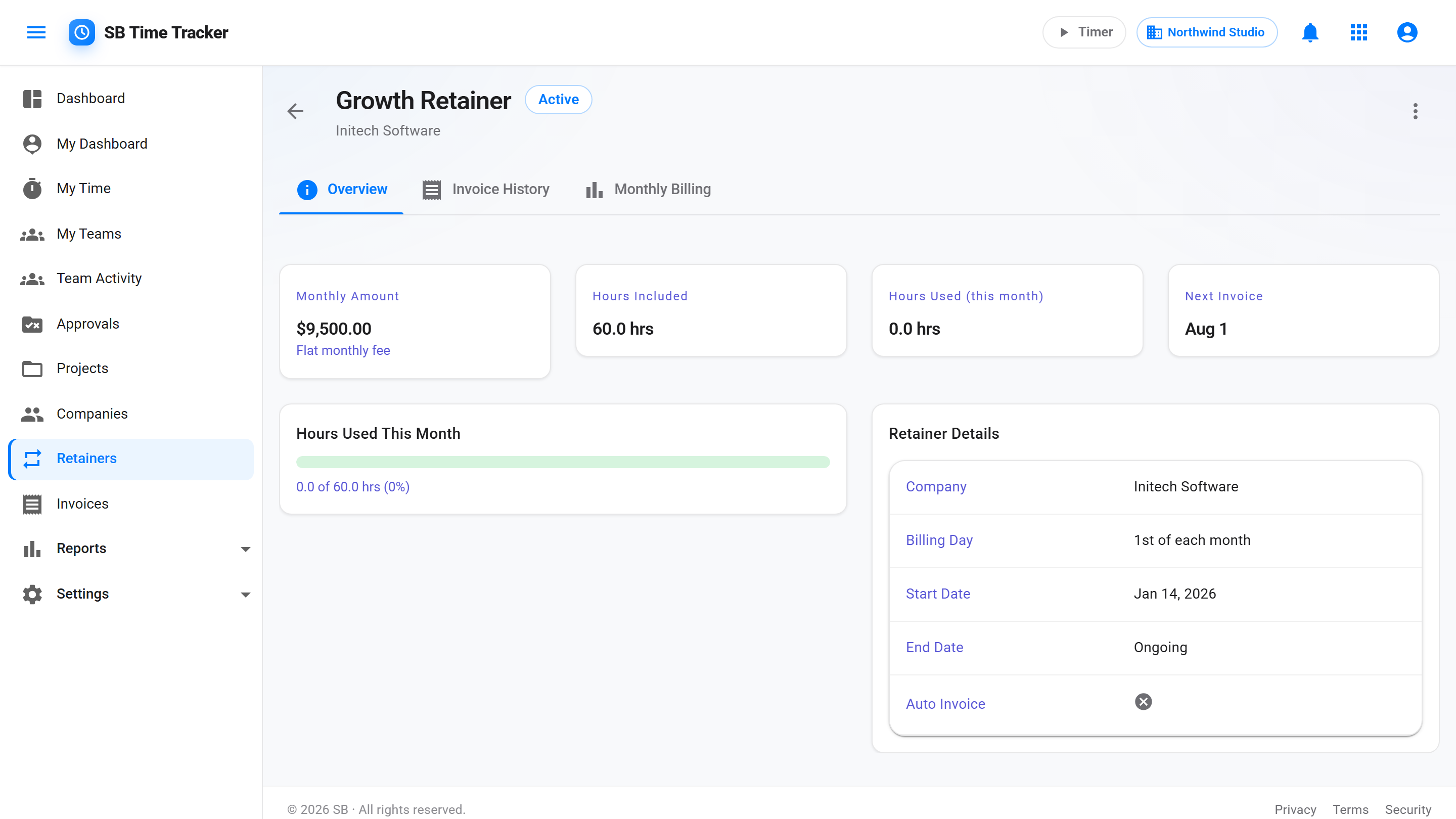
Set a flat monthly retainer amount, with an optional hours allowance for tracking. A draft invoice is created on the billing day you choose (1st–28th), ready for you to review. A gauge shows hours used vs the allowance for the current billing period.
Cost rate vs billable rate
Two rates per person. The P&L report uses both. Margin % isn't a guess — it's revenue minus cost, surfaced per project.
Per-project rate overrides
Senior consultant bills $250 on one client and $200 on another? Set the override on the project. Reports honor the hierarchy automatically.
Team-based access
Group people into the Brand team or the Dev team. Assign teams to projects and clients. New hires get access on day one without 30 permission flips.
Auto-overdue dunning
The invoice goes overdue and reminders go out automatically at 7, 30, and 60 days past due. You stop chasing.
"How much of the 40 did we use?"
Most tools force you to fake retainers as projects with hour budgets — which works until you need to run a P&L on the actual retainer revenue. We built retainers as a first-class concept: a flat monthly amount with an optional hours allowance, and hours used against it each billing period.
- First-class retainer model — not a project workaround
- Flat monthly amount with an optional hours allowance
- Billed monthly — a draft on the billing day you choose, for you to review
- Hours used vs the allowance for the current billing period
"Are we actually making money on this client?"
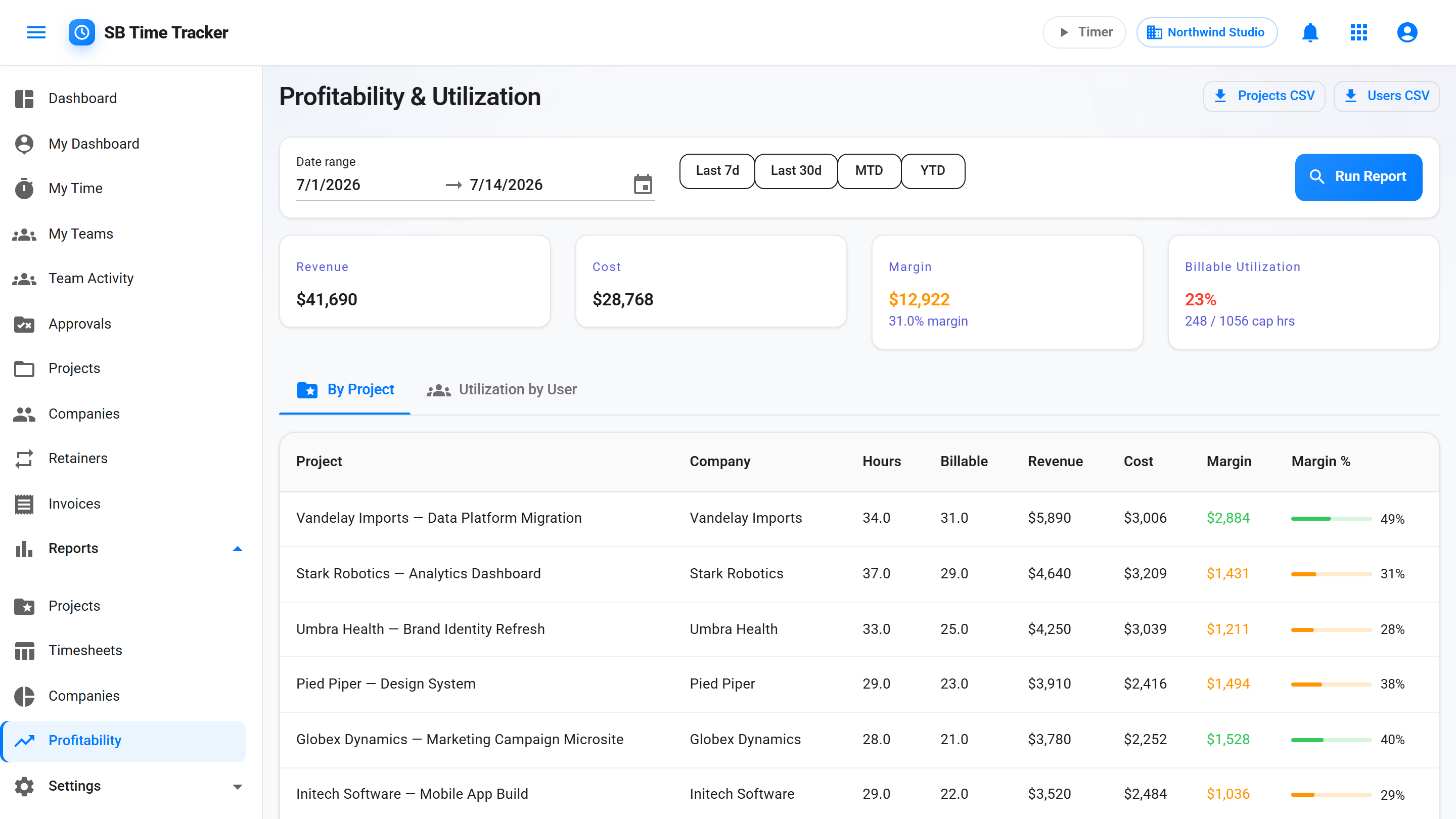
If you only track billable rate, every project looks profitable. If you track cost rate alongside it, you can see which clients are actually paying for your senior bench. The Profitability report does the math: revenue − cost, per project, per period.
- Project P&L with revenue, cost, margin, margin %
- Drill from any project to entry-level detail
- Sort by margin % to find your best and worst clients
- In-app budget alert at 80% and 100% when you open the project
- CSV export for the partner who wants to model it themselves
"Should we hire?"
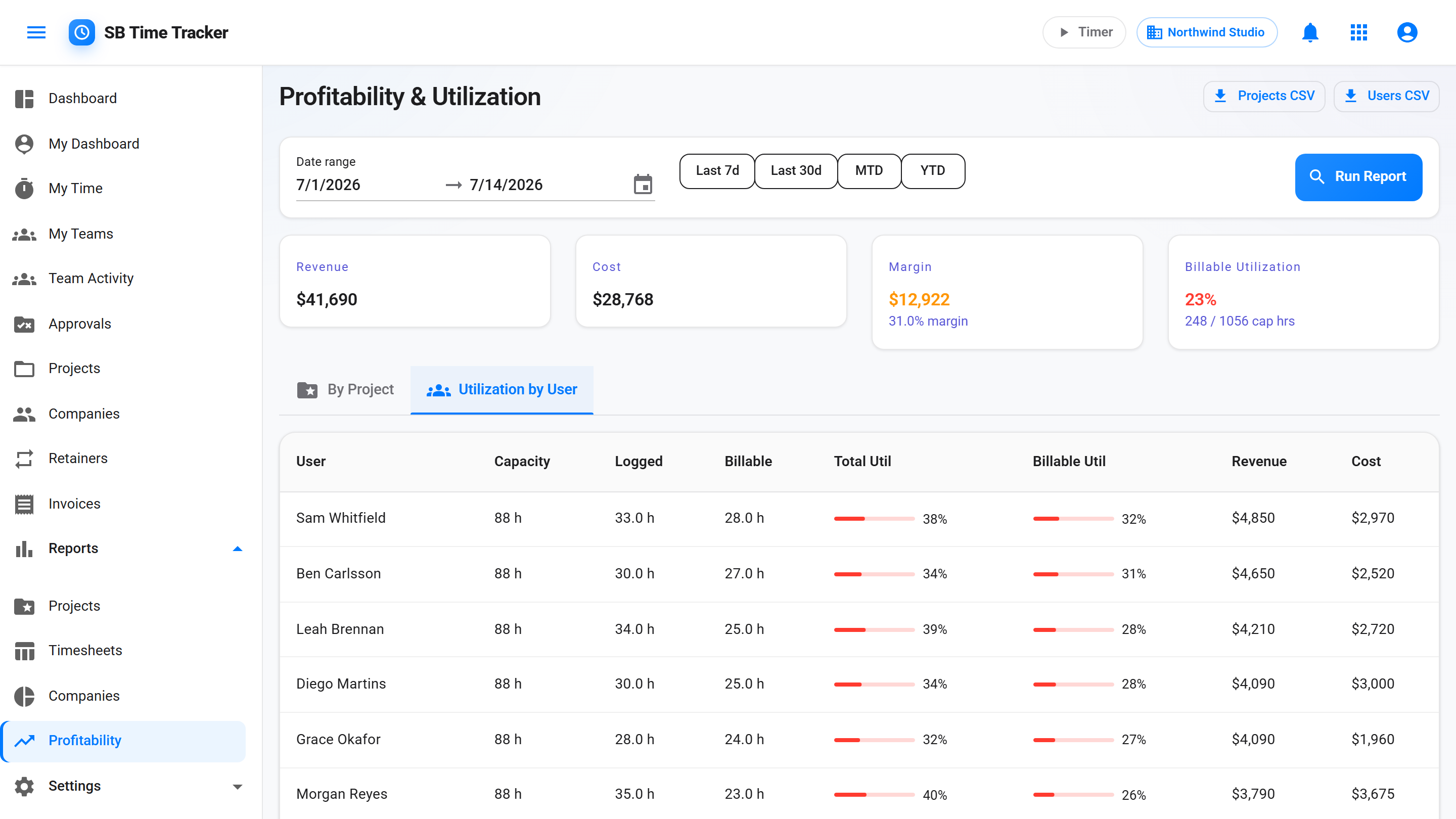
The Utilization report compares logged hours against weekly capacity (40h default, override per person), split into billable vs total. Three weeks at 110% billable on a senior is a hiring signal. Three weeks at 60% is a different signal. You stop deciding based on vibes.
- Per-user weekly utilization
- Billable % and total %, side by side
- Capacity-aware (40h default, override per person)
- Heatmap across the team
- Weekly + monthly rollups
"Did anyone send the reminder?"
A Net 30 invoice goes overdue, then reminders go out at 7, 30, and 60 days past due. The dunning service runs on its own schedule. You only step in if the client actually responds with a question.
- Auto-overdue on due-date passage
- Three-stage dunning cadence at 7, 30, and 60 days past due
- Stops automatically on payment
- Per-invoice dunning audit trail
Migrate from Harvest in under an hour.
CSV import accepts standard Harvest exports. Projects and time entries come over with names preserved, people are matched by email or name, and missing companies and projects are created in the same pass. You see a preview before anything is saved.
| Feature | SB Time Tracker | Harvest |
|---|---|---|
| Free trial | 30 days, full features, no card | 30 days on any plan, no card — plus a free 1-seat, 2-project plan |
| Price — every app included | $14 / seat / mo (all-inclusive) | Teams $9, Enterprise $14 / seat / mo billed annually ($11 and $17.50 billed monthly) |
| Usage-based fees | None. The bill is seats × $14 | Yes. Additional invoices, projects, clients and tasks are billed based on what you use (per-unit prices not published; checked 25 October 2026) |
| First-class retainer model | Yes — flat monthly amount, auto-invoiced | Yes — prepaid retainer balance that invoices draw from |
| Recurring invoices from retainers | Yes | No — recurring invoices can't draw from a retainer |
| Cost rate vs billable rate split | Yes | Yes — cost rates plus default and per-project billable rates |
| Project P&L with margin % | Yes — on the one plan | Yes — profitability report, on the Enterprise plan |
| Per-user-per-project rate override | Yes | Yes — project-specific person rates, but a project bills by project, person, or task rate, not a mix |
| Auto-overdue + dunning emails | Yes | Yes — automated late reminders on a schedule you set |
| Team-based access (with Team Leads) | Yes | Permission groups |
| CSV import from Harvest | Yes | n/a |
Agency questions we get a lot
We have 5 people. Will this fit?
Yes — that's the sweet spot. We built this for small business shops. At 5 people, it's $14/seat/mo and gets you the full stack — every app included, no tiers, no feature gates.
How does the free trial work?
Every account starts with a 30-day free trial of every feature — invoicing, profitability, dunning, the portal — with no credit card. When the trial ends without a card, your account goes read-only for 90 days (your data stays safe and fully visible), and you add a card to reactivate. One plan, $14 per seat per month, every app included.
Can subcontractors log time?
Yes. Add them as Employee or Manager users. Set their cost rate to what you actually pay them, their billable rate to what the client pays. Profitability report nets the difference automatically.
What if we have non-billable internal projects?
Every project belongs to a client, so model internal work (R&D, marketing, ops) as a project under your own company. Mark it non-billable and the work still counts toward total utilization but doesn't show up on client reports or invoices.
Can clients see their own invoices?
Yes. The client portal gives each client contact a private read-only login to see their open / paid invoices and their logged hours by project for the current month. Every sent invoice also has a hosted page you can link them to directly — no login needed — and once you connect your Stripe account, clients pay right there by card or ACH.
What about non-US agencies?
Each tenant picks the display currency all money renders in — any ISO 4217 currency (default USD), and each invoice snapshots its currency. What we don't do yet is FX conversion (we don't convert between currencies) or international VAT/tax — the tax model is still a single rate per invoice, no VAT logic. If you need exchange-rate conversion or VAT today, stay on Harvest.
What's the typical setup time?
Under an hour. Create the company, import your Harvest CSV, set rates per person, and set up your first retainer.